
How to Do a SERP Analysis That Tells You Which Keywords You Can Actually Win
A SERP analysis answers one question: if I write a page targeting this keyword, can it realistically rank? The honest way to answer it is to look at the pages that already rank and measure how strong they are. This guide walks through that workflow the way SEO Vein Finder does it — with real top-10 results and referring-domain counts, not a black-box difficulty number.
What you are actually looking for
Search engines lean heavily on links when deciding which pages deserve the top positions, so the number of unique websites linking to a ranking page's domain — its referring-domain count — is a strong, inspectable proxy for how hard that page is to displace. The key insight: you do not need to beat the strongest result on the page. You need to beat the weakest one, because that is the slot a new article can take.
A keyword where every ranking page sits on a domain with hundreds of thousands of linking sites is a wall. A keyword where even one top-10 page sits on a small site with a few hundred linking domains is a door. SERP analysis is the process of telling those two apart before you write a word.
The workflow, step by step
Step 1.Search a seed keyword with your own thresholds
Step 2.Read the results table
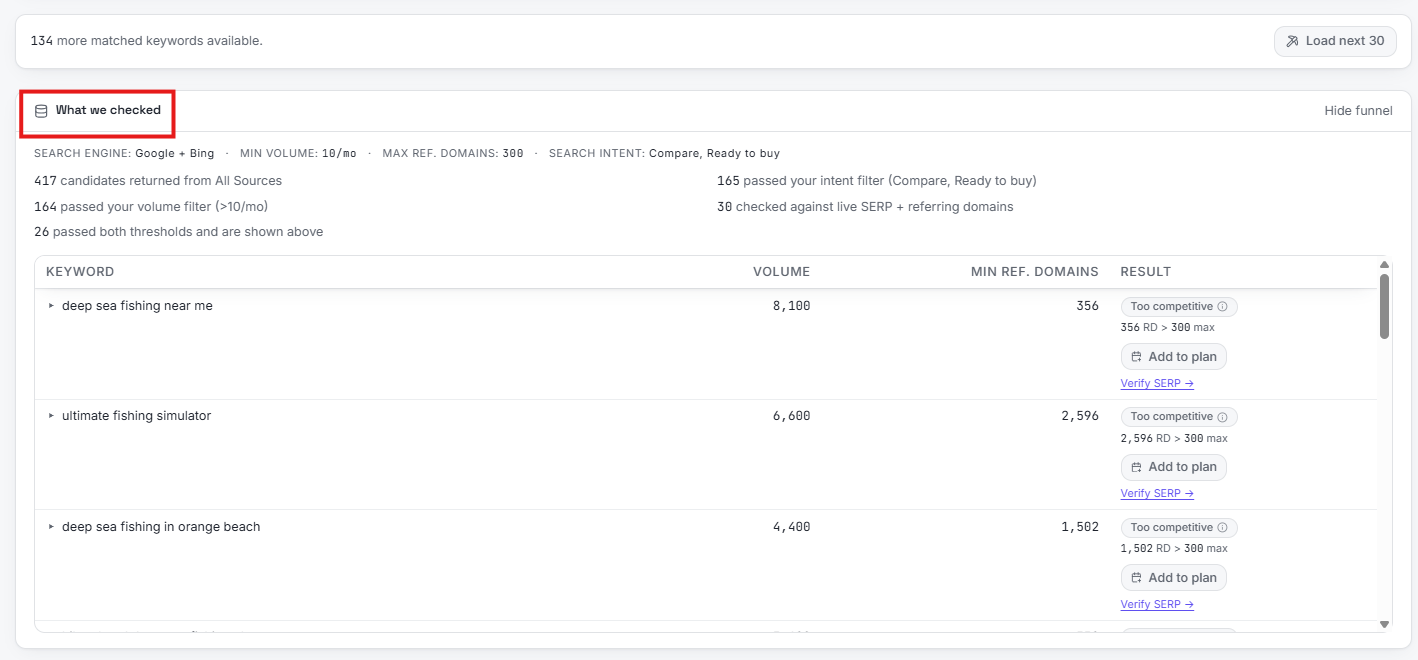
Step 3.Inspect the weak spots in What We Checked
Step 4.Check the funnel, not just the winners
Step 5.Run a Domain Gap check on a competitor
What a good result looks like
A keyword worth writing about has three properties: volume above your minimum, at least one clearly weak page in the top results, and an intent that matches the content you plan to publish. When all three line up, the Opportunity score reflects it — 60% Ease from the referring-domain weakness, 40% Volume from the demand — and the keyword lands in the High tier. From there you can add it to your content plan, generate the article, and publish it to WordPress or Blogger without leaving the tool.
Open the SEO Vein Finder demo and walk through this exact workflow on sample data — the results table, the scores, and the What We Checked panel — with no signup. The demo uses static sample data; running live searches on your own keywords requires an account.
Frequently asked questions
What is a SERP analysis?
A SERP analysis means looking at the search results page for a keyword and judging whether a new page from your site could realistically rank there. Instead of trusting a single difficulty number, you inspect the pages that actually rank: who they are, how strong their link profiles are, and whether any of them look beatable.
Why use referring domains instead of a keyword difficulty score?
A keyword difficulty score is a proprietary blend computed differently by every tool, and you cannot see what went into it. A referring-domain count is a concrete number tied to the specific pages ranking for that keyword. If the weakest page in the top results sits on a domain with few linking sites, that is an opening you can verify yourself.
How many results does SEO Vein Finder check per keyword?
For each keyword that passes your volume and intent filters, SEO Vein Finder pulls the live top results on Google and Bing and shows the top 8 organic results in the What We Checked panel, with a domain-level referring-domain count for each one.
Can I try this workflow without an account?
Yes. The demo's Keyword Search view runs the same workflow on static sample data — results table, scores, and the What We Checked panel — with no signup. Running live searches on your own keywords requires an account.
Ready to analyze a real results page instead of trusting a score? Try the SEO Vein Finder demo — the Keyword Search view shows the full workflow on sample data with no signup.