
AI Video Script Generator for Keywords You Can Actually Rank For
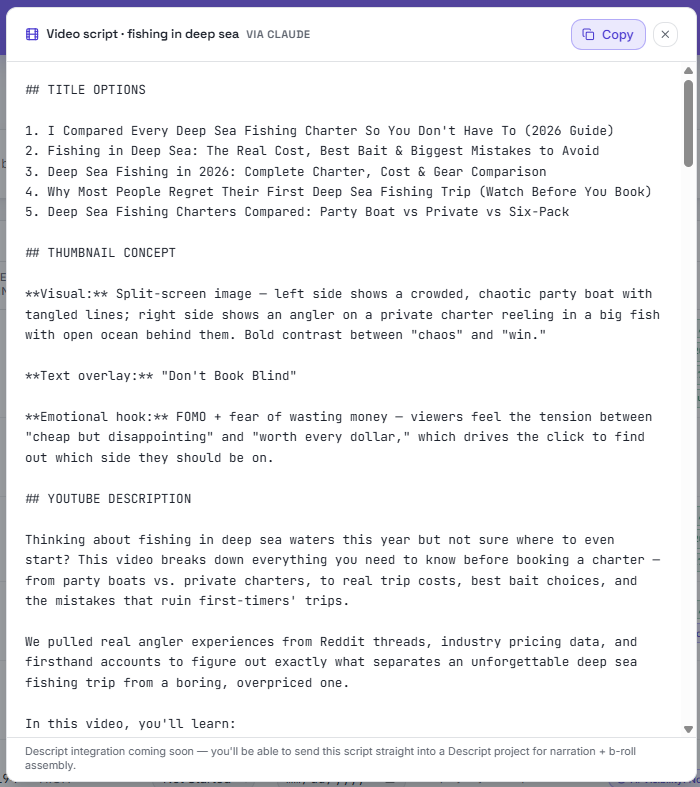
A keyword with weak competition on Google is often just as open on YouTube — and the research you already did is most of the work of a good video. SEO Vein Finder turns the article for a keyword into a complete video package you can record from, so one keyword becomes both a post and a video.
How it works
Step 1.Start from a keyword with an article
Step 2.Add special instructions
Step 3.Generate, review and copy
Written to be spoken, not read
- Title options with different angles: one curiosity-driven, one benefit-led, one direct and keyword-focused.
- A thumbnail concept: the key visual, a 3-to-5-word text overlay and the emotional hook.
- A YouTube description that uses the keyword naturally, with [Timestamps] and affiliate-link placeholders ready to fill.
- A teleprompter-style script with short, punchy lines in natural spoken rhythm.
- A bracketed b-roll cue for each section, such as a slow zoom on the product or a screen recording of a comparison.
What's coming: Descript export
We're working on sending scripts straight into a Descript project for narration and b-roll assembly. It isn't available yet — the script window marks it as coming soon. Until then, Copy gives you the full script to paste into Descript or any editor.
Frequently asked questions
What does a generated video script include?
Four parts in one document. You get 3 to 5 title options, each from a different angle, and a thumbnail concept with the key visual, a short text overlay and the emotional hook. Then a YouTube description that uses the keyword naturally, with placeholders for timestamps and your affiliate link. Last is the full script, split into hook, intro, main content, call to action and outro, with a b-roll cue for each section.
Why do I need an article first?
The script is built from the article you generated for the same keyword, so the video and the article share the same research and angle. If there is no article yet, the tool asks you to generate one first.
Does it create the thumbnail image?
No. The thumbnail concept is creative direction — what to show, the overlay text and the feeling it should trigger — for you or your designer to produce.
Can I send the script to Descript?
Not yet. A Descript integration, which would send the script into a Descript project for narration and b-roll assembly, is planned but not available today. For now, use Copy to take the script into Descript or any other editor yourself.
Which AI writes the script?
Your own connected AI provider — Claude, ChatGPT or Grok — using your API key from AI Settings. Special instructions you add for a keyword are included in the prompt and remembered for next time.
Which plan includes video scripts, and can I try it first?
Video scripts are part of the Pro and Agency plans. The Content Plan demo shows a sample video script on sample data with no signup; copying it asks you to create an account.
Read a full sample script before you sign up: open the Content Plan demo, open the More menu on any keyword and choose Create Video.