Build a One-Page Affiliate Website with Lovable — From a Keyword You Can Actually Rank For
Some keywords are better served by a focused one-page site than by another blog post — a single product, a clear buying decision, one call to action. SEO Vein Finder's Build Landing Page Prompt turns a keyword you found with weak competition into a complete brief for Lovable, so the page is built around real search demand instead of guesswork.
From keyword to live page
Step 1.Pick a keyword worth a page
Step 2.Describe the offer
Step 3.Point the main CTA where you want clicks
Step 4.Build the prompt, then build in Lovable
What the prompt tells Lovable
- The search facts: target and secondary keywords, search intent, priority tier, estimated traffic and ad competition.
- Buyer pain points taken from People Also Ask questions and real Reddit thread titles.
- A nine-section structure, from hero and quick verdict to pros and cons, FAQs and a final recommendation.
- CTA rules: 3 to 5 buttons placed at key moments, all pointing at your destination and never at a third-party retailer.
- Writing and SEO rules: skimmable one-to-two-sentence paragraphs, bolded key points, the keyword in the H1, and a meta title and description.
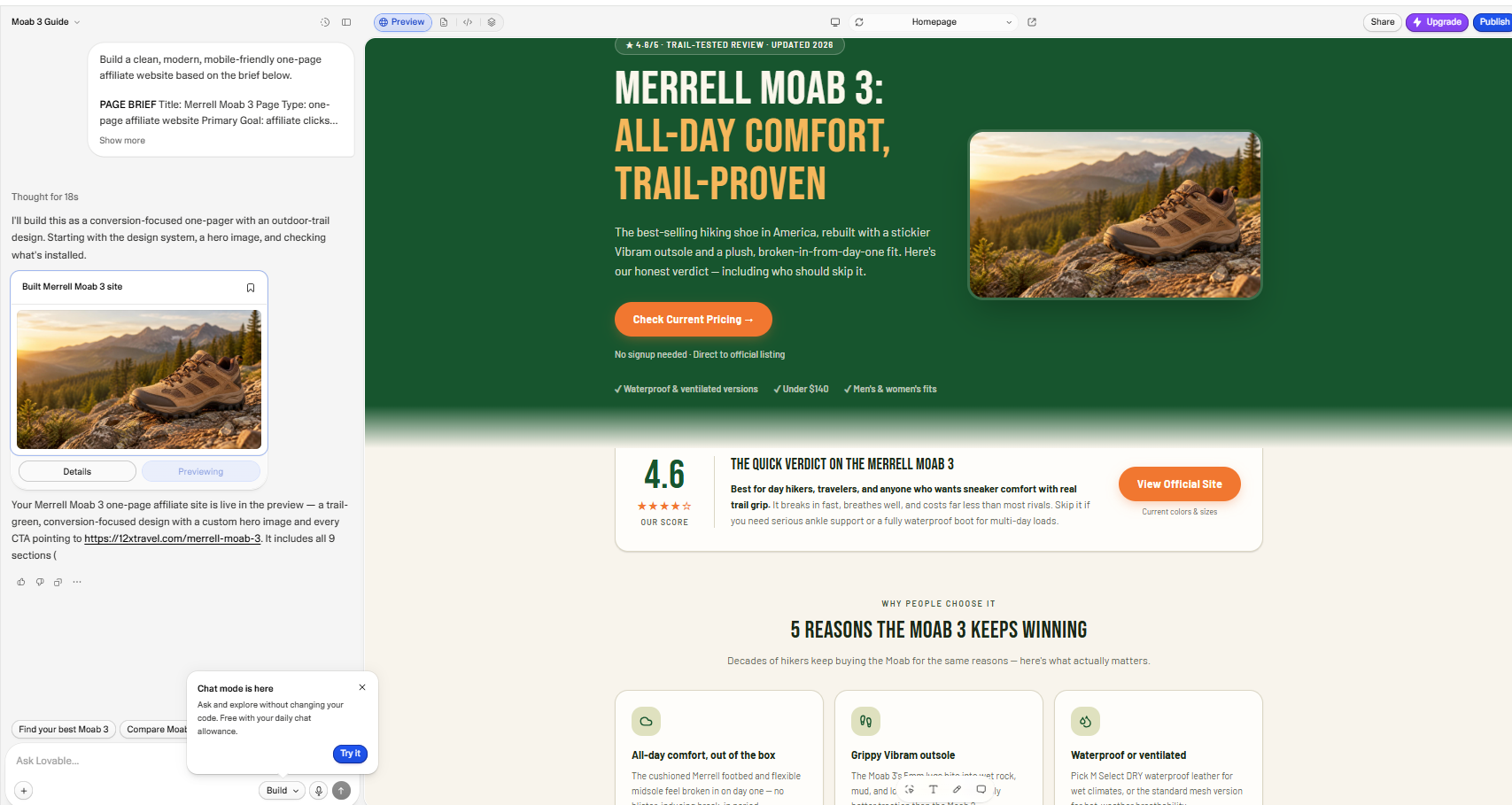
The result in the screenshot above came from exactly this flow: a Merrell Moab 3 keyword, a one-sentence promise and a Pretty Link, turned into a conversion-focused page with a custom hero image, a verdict card and call-to-action buttons throughout.
Frequently asked questions
Does SEO Vein Finder build the website for me?
It writes the complete prompt; Lovable builds the site. Click Build in Lovable to open Lovable in a new tab with the prompt already filled in, or copy it and paste it in yourself. The build runs in your own Lovable account, under your Lovable plan.
Do I need a WordPress site or Pretty Links to use it?
No. Choose Enter URL manually and type any destination for the main call-to-action, such as your affiliate link. If you have a WordPress site connected with the Pretty Links bridge plugin, you can switch to Pick a Pretty Link instead, and choose which connected site to pull them from.
What goes into the prompt?
Your keyword research and your offer. That means the page title, page type and goal, search intent, target and secondary keywords, priority tier, an estimated traffic figure, and ad competition. It also includes buyer pain points from Google's People Also Ask questions and real Reddit thread titles, plus your brand or product name, niche, main promise and CTA destination.
What does the finished page include?
The prompt asks for nine sections: a hero, a quick verdict, main benefits, an overview, trust and legitimacy, pricing and value, pros and cons, 4 to 8 FAQs, and a final recommendation. It also asks for 3 to 5 CTA buttons that all point to your destination, never a third-party retailer, along with a meta title and meta description.
Is there a length limit?
Lovable accepts prompts of up to 50,000 characters through its pre-filled link. If a prompt is longer, the window warns you that Build in Lovable will send a shortened version, so you can copy the full text instead.
Which plan includes the Landing Page Prompt, and can I try it first?
The Build Landing Page Prompt action is part of the Agency plan. The Content Plan demo lets you open the setup form and see a sample prompt with no signup; copying it or sending it to Lovable asks you to create an account.
See the setup form and a sample prompt with no signup: open the Content Plan demo and click Build Landing Page Prompt on any keyword.